
Every won job starts itself
Friendly8 workflow automation for small business: set up each rule in one sentence.
Why do the same follow-ups keep slipping?
After every won job, new lead or paid invoice you do the same clicks by hand. On a busy week you skip one, the customer waits for a start date, and it nags you all evening. You started a business to do the work, not to copy things between screens.
What changes with Friendly8
No code needed
Type what should happen in plain language, and the AI turns it into steps.
Check before it runs
You see every planned step before you switch the automation on.
Zapier, Make and n8n via webhook
Send any trigger as a signed webhook to Zapier, Make, n8n or your own system.
How do Friendly8 automations work?
Friendly8 automations connect your CRM, task boards and invoices without code: pick a trigger such as Deal Closed Won, describe the next step in one sentence, and the AI turns it into actions you check before anything runs.
Pick the moment and say what should happen
Open Automations, click New and choose a trigger, such as Deal Closed Won. Then type the next step in plain language, for example "Create a job board named after the deal."
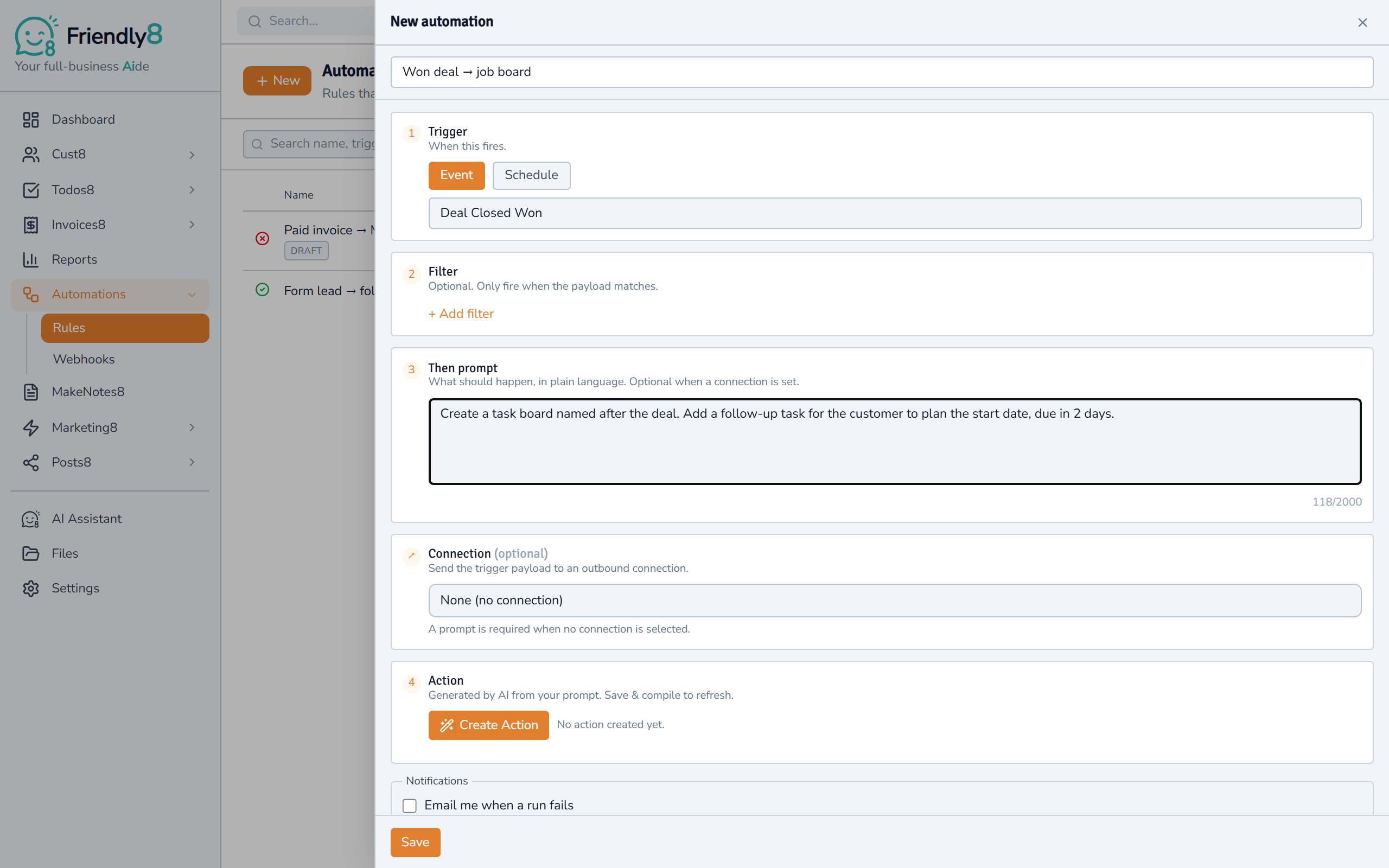
Check the steps the AI planned
Click Create Action and Friendly8 shows each planned step in plain English. Nothing runs yet. If the AI wasn't sure, you approve the plan first.
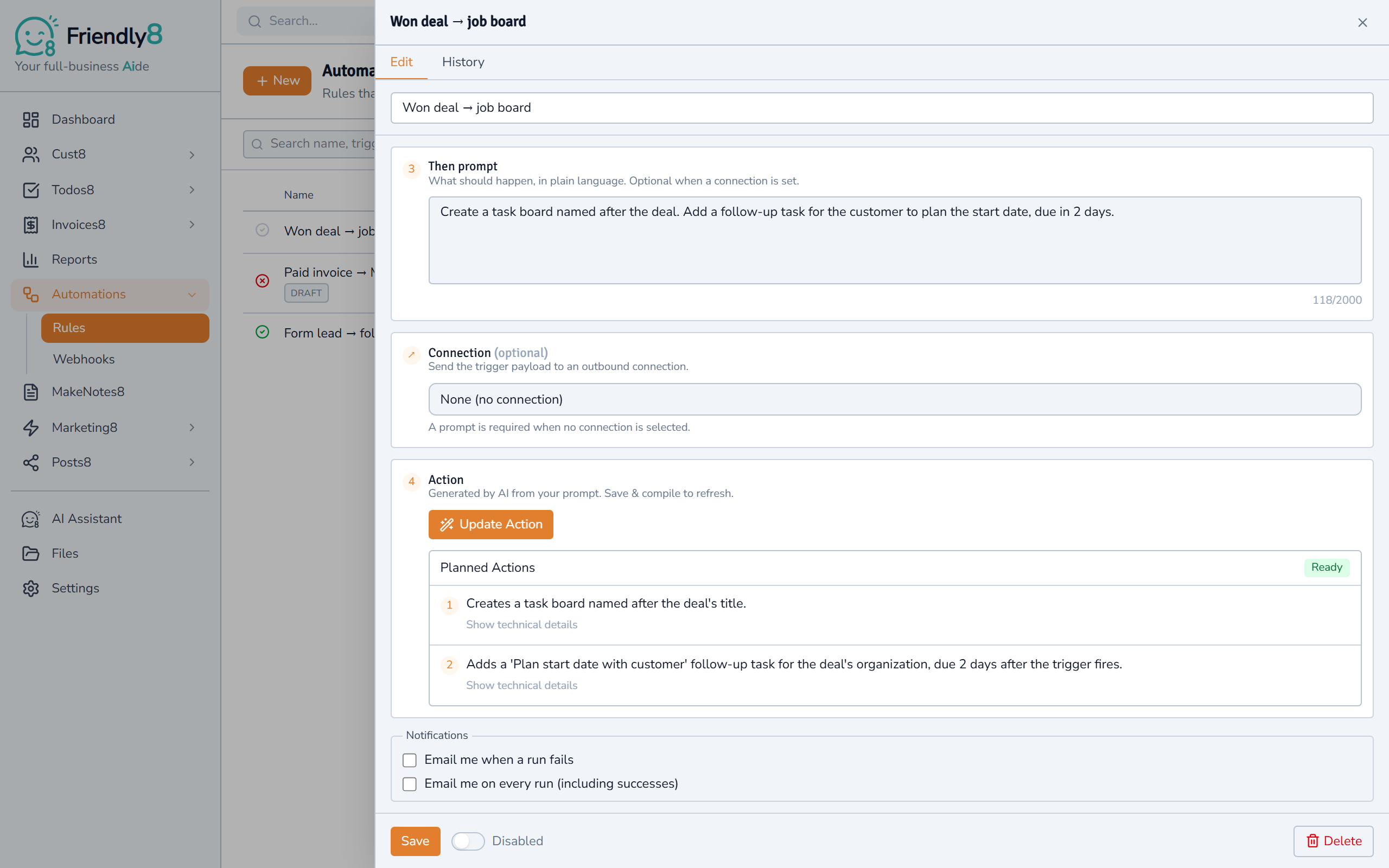
Switch it on and let it run
Turn the automation on, and it runs every time the trigger fires. Here, accepting the quote for "Kitchen refit Jansen" created its job board and a start-date task, due 2 days later. The Automations list shows each rule's runs and last status, and you can get an email if a run fails.

Get started in 3 steps
- Sign up free at app.friendly8.com, no credit card needed
- Open Automations and click New
- Pick a trigger, say what should happen, check the steps and switch it on
Frequently asked questions
Can a CRM integrate with a task manager?
In Friendly8 they're already one tool. An automation can create a task board when a deal is won, or add a task to the customer when a form comes in. You set it up in one sentence, without code.
How do I stop losing leads from missed follow-ups?
Let the follow-up create itself. Friendly8 is contractor software to capture leads and follow up automatically. When a website form is submitted, an automation adds a dated follow-up task to that contact. A newsletter Call-me-back reply already creates a call task for you.
Does Friendly8 work with Zapier, Make or n8n?
Yes, through a webhook. An admin adds a Connection in Settings → Connections. Friendly8 then sends each trigger as signed JSON to the webhook step in Zapier, Make or n8n, or to your own URL. Failed deliveries are retried automatically. There's no Friendly8 app in their app directories, so you start with their webhook trigger.
Is workflow automation included in the free plan?
Yes, the Free plan includes one automation. Free includes AI in your first month, so create its steps then. A rule that only sends to a Connection needs no AI. Growth (€19 per user per month) gives you 10 automations, and Scale (€49) gives you 50.
Let the next won job set itself up
The customer approves the quote, and the job board and the follow-up task are already waiting. Start free, no credit card needed.