
See where your jobs stand at a glance
Sales reports for small business: your funnel, new and closed deals and team activity.
Busy, but is enough work coming in?
Your deals are in the CRM, your calls in your phone and last year's numbers in a spreadsheet nobody updates. So you feel busy, but you can't tell whether work is growing or drying up. You shouldn't need an evening with a calculator to know how your month went.
What changes with Friendly8
Your funnel in one chart
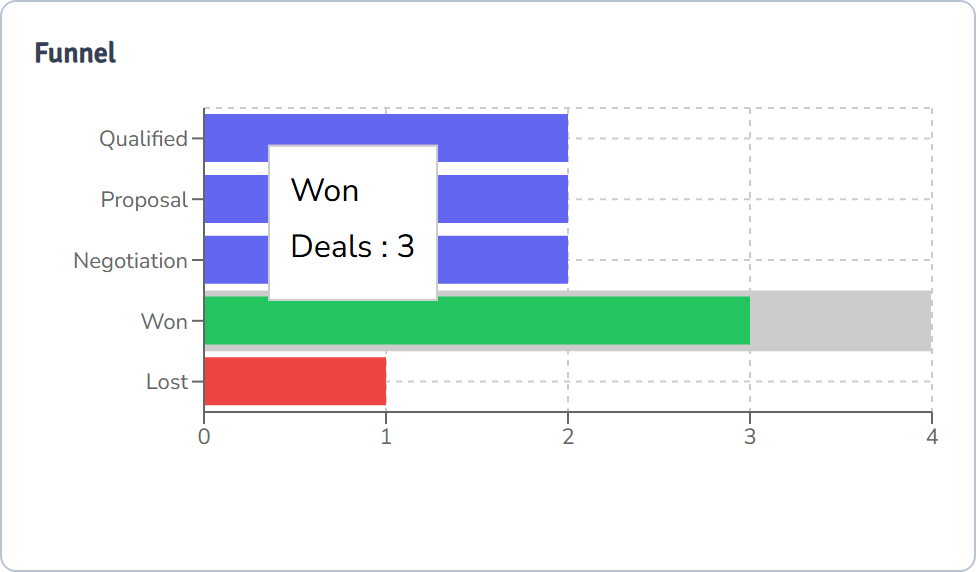
See how many of this period's deals sit in each stage, and how many you won or lost.
New versus closed deals
Compare the deals that came in with the deals you closed, per month or per week.
Who did what
See the calls, emails and notes each person on your team logged.
How do Friendly8 reports work?
Friendly8 is built for contractors, tradespeople, and small service firms in Europe who currently juggle a separate CRM, quoting tool, task app, and invoicing app, and lose time and leads to the gaps between them.
Your deals and calls already live in Friendly8, so the charts fill themselves. No spreadsheet to build or update.
Open Reports and pick a period
Click Reports in the sidebar and choose the last 7, 30 or 90 days, a quarter or your own dates. The Deals chart shows deals created and closed per month or week. Activity by Rep shows the calls, emails and notes each person logged.
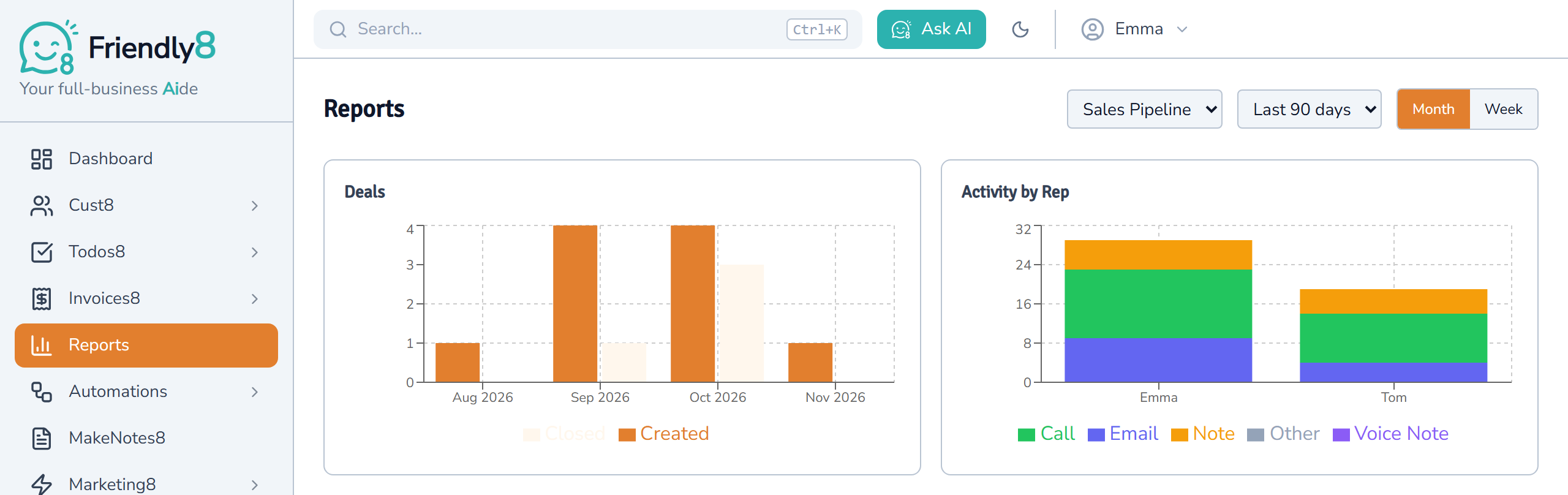
See where this period's deals are now
The funnel counts the deals created in your period and shows the stage each one is in today. Won deals show in green, lost deals in red.
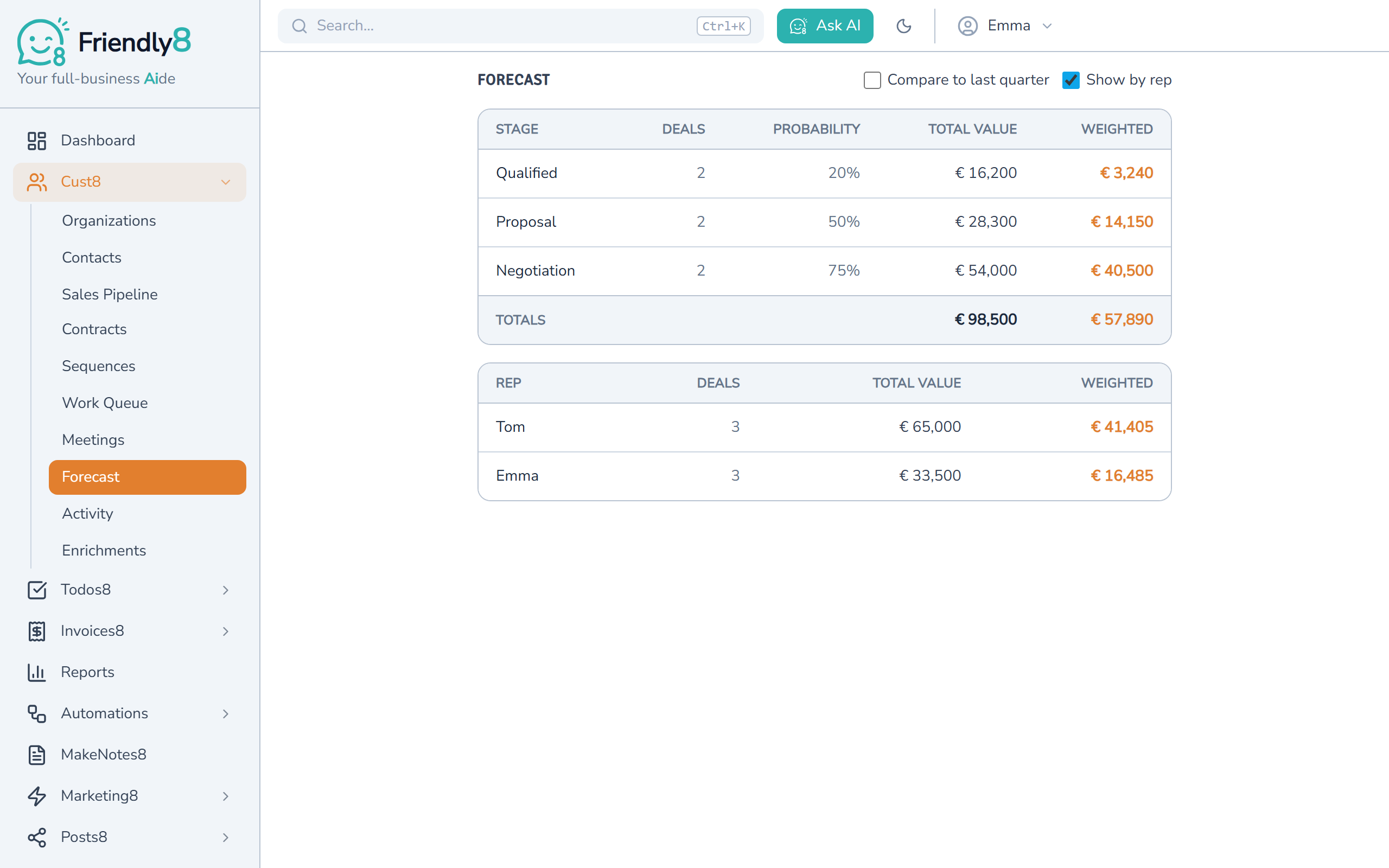
See what's likely to come in
Open Forecast for your open deals per stage, with the total value and a weighted value based on each stage's chance of winning. Tick "Show by rep" to split it per person.
Get started in 3 steps
- Sign up free at app.friendly8.com. No credit card needed.
- Add your jobs as deals and log your calls and emails on the customer's card.
- Open Reports and pick a period.
Frequently asked questions
What should a small business track in its sales reports?
Start with four numbers: new deals, deals won or lost, where your open deals are, and what they're worth. Reports show your new, won and lost deals, and where this period's deals are now. Forecast shows all your open deals by stage, with their total and weighted value.
How do I see my sales funnel in Friendly8?
Click Reports in the sidebar. The Funnel chart counts the deals created in the period you pick. It shows the stage each one is in now, with Won and Lost at the bottom. If you have more than one pipeline, pick it at the top of the page.
Can I ask AI how my sales are going?
Yes, if your plan includes the AI assistant. Ask something like "How many new deals came in over the last 30 days?" It reads the same numbers as the Reports page. On Free, the AI assistant is included for your first month.
Are reports included in the free plan?
Yes. The Reports page and the Forecast view are on every plan, including Free. The free plan has one sales pipeline and up to 10 deals. Paid plans cost €19 (Growth) or €49 (Scale) per user per month and raise those limits.
Know how your month is going
Log your jobs as deals and see this month's numbers on one page. No credit card needed.